Plugin Repo
Cloud
AI Developed
Control your 3D printer's power supply using eWeLink smart switches (Sonoff, etc.) through the PSU Control plugin.
Integrate eWeLink smart switches (Sonoff, etc.) with OctoPrint-PSUControl to turn your 3D printer on and off remotely.
Features
- Cloud Integration: Control any eWeLink-compatible device (Sonoff Basic, S26, etc.)
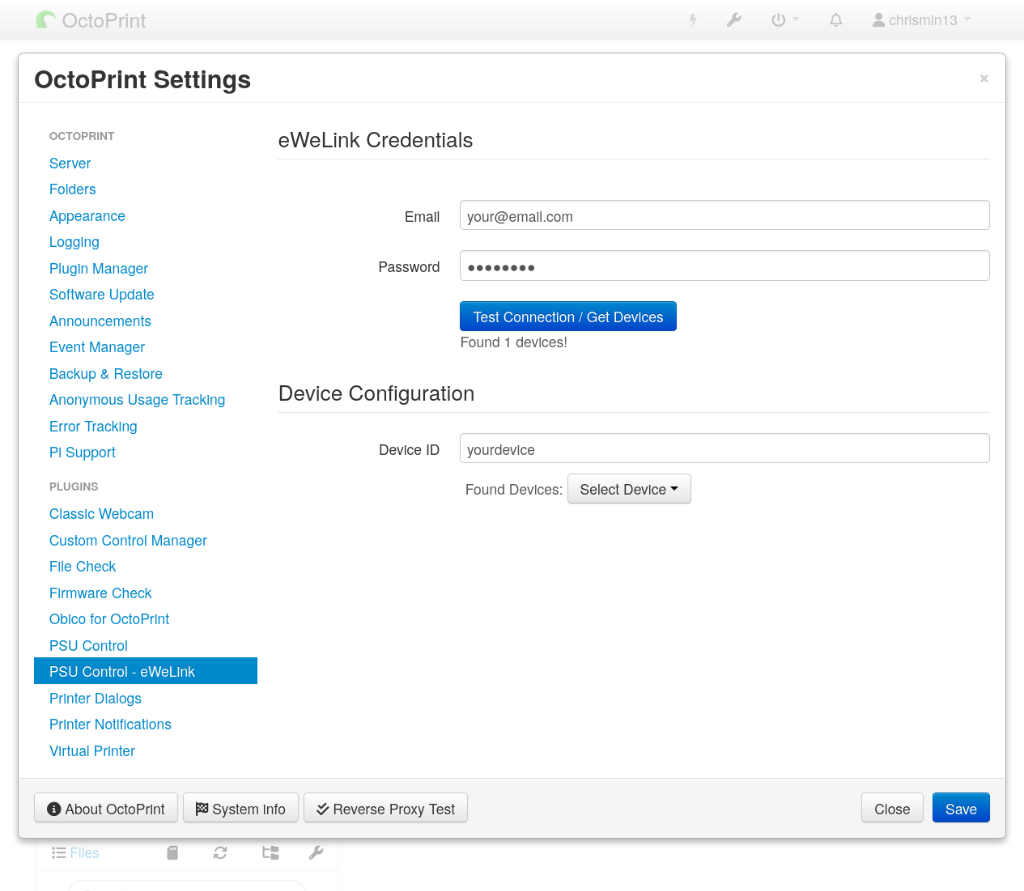
- Device Discovery: Test connection and browse devices directly in OctoPrint settings
- State Sensing: Real-time feedback on switch state
Requirements
- OctoPrint 1.9.0 or higher
- OctoPrint-PSUControl plugin installed
- eWeLink account and compatible smart switch
- Active internet connection
External Services
This plugin connects to the eWeLink Cloud API to control your smart devices. An active internet connection is required for all functionality. Your eWeLink credentials are transmitted securely over HTTPS to eWeLink’s servers.
The plugin does not collect or transmit any data to third parties other than eWeLink.
Setup
- Install via Plugin Manager
- Navigate to Settings → PSU Control - eWeLink
- Enter your eWeLink email and password
- Click Test Connection / Get Devices
- Select your device from the dropdown
- Save settings
- Go to PSU Control settings and select this plugin for switching/sensing
Troubleshooting
- Authentication Failed: Double-check your eWeLink email and password
- Device Not Found: Ensure the device is “Online” in the eWeLink app
- Connection Issues: Check your internet connection; the eWeLink cloud must be reachable
Pictures