Plugin Repo
Cloud
AI Developed
Reach OctoPrint from anywhere through Pangolin. Installs, verifies and runs the Newt tunnel client for you.
Makes your OctoPrint reachable through Pangolin without opening ports and without a terminal.
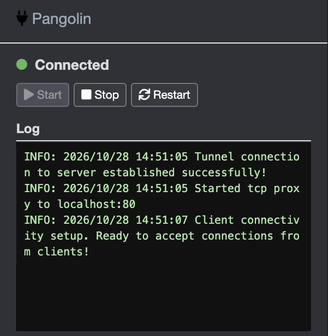
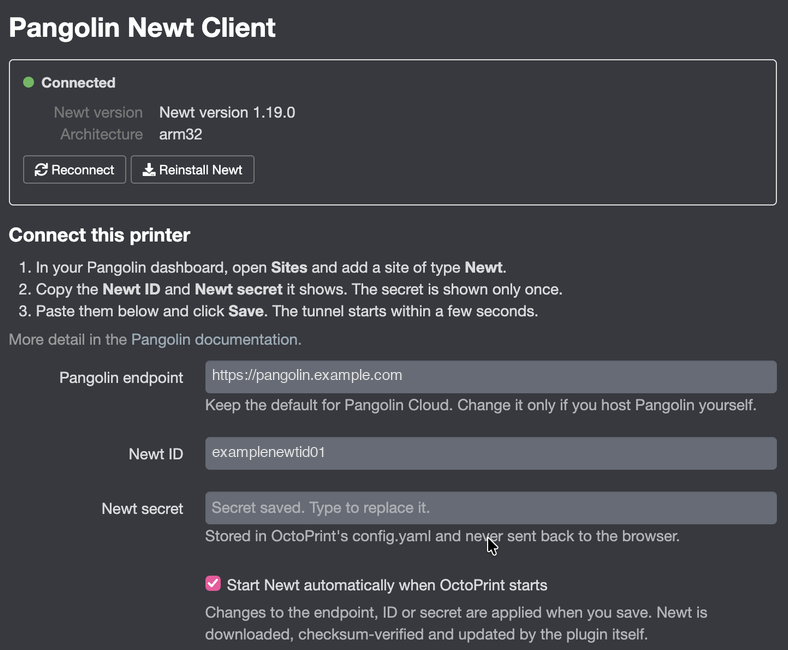
Enter your Pangolin endpoint, Newt ID and Newt secret in the settings and save. The plugin downloads the matching Newt build for your Pi, verifies its sha256 checksum and keeps it running alongside OctoPrint. The sidebar shows whether the tunnel is connected, along with Start, Stop and Restart buttons and Newt’s live log.
After the first install Newt keeps itself up to date: it updates in place when your Pangolin server offers a new version.
Requirements
- A Pangolin server: Pangolin Cloud or your own self-hosted instance, reachable over https.
- A site of type Newt created in the Pangolin dashboard, which gives you the Newt ID and secret.
- Linux on arm64, 32-bit ARM (armv7 / armv6) or x86_64. Tested on OctoPi 1.1 with OctoPrint 1.11, and with OctoPrint 2.0.0rc7.
What the plugin does on your system
- Downloads the official Newt binary from Newt’s GitHub releases into OctoPrint’s plugin data folder and verifies its sha256 against the checksum pinned in the plugin release. Newt later updates itself in that folder when your Pangolin server offers a new version. It installs nothing system-wide and does not need root or sudo.
- Runs Newt as a child process of OctoPrint while the tunnel is enabled, and stops it when OctoPrint shuts down.
- Newt connects to the Pangolin endpoint you configure, over https only.
- No tracking or analytics. The Newt secret stays in OctoPrint’s config.yaml and is never sent back to the browser. See the privacy policy for what Newt sends to Pangolin, Fossorial and GitHub.
Pictures